
How to use
Easy Guide to Creating & Earning from Affiliate Links
Block types, ordering, and what to show or hide.
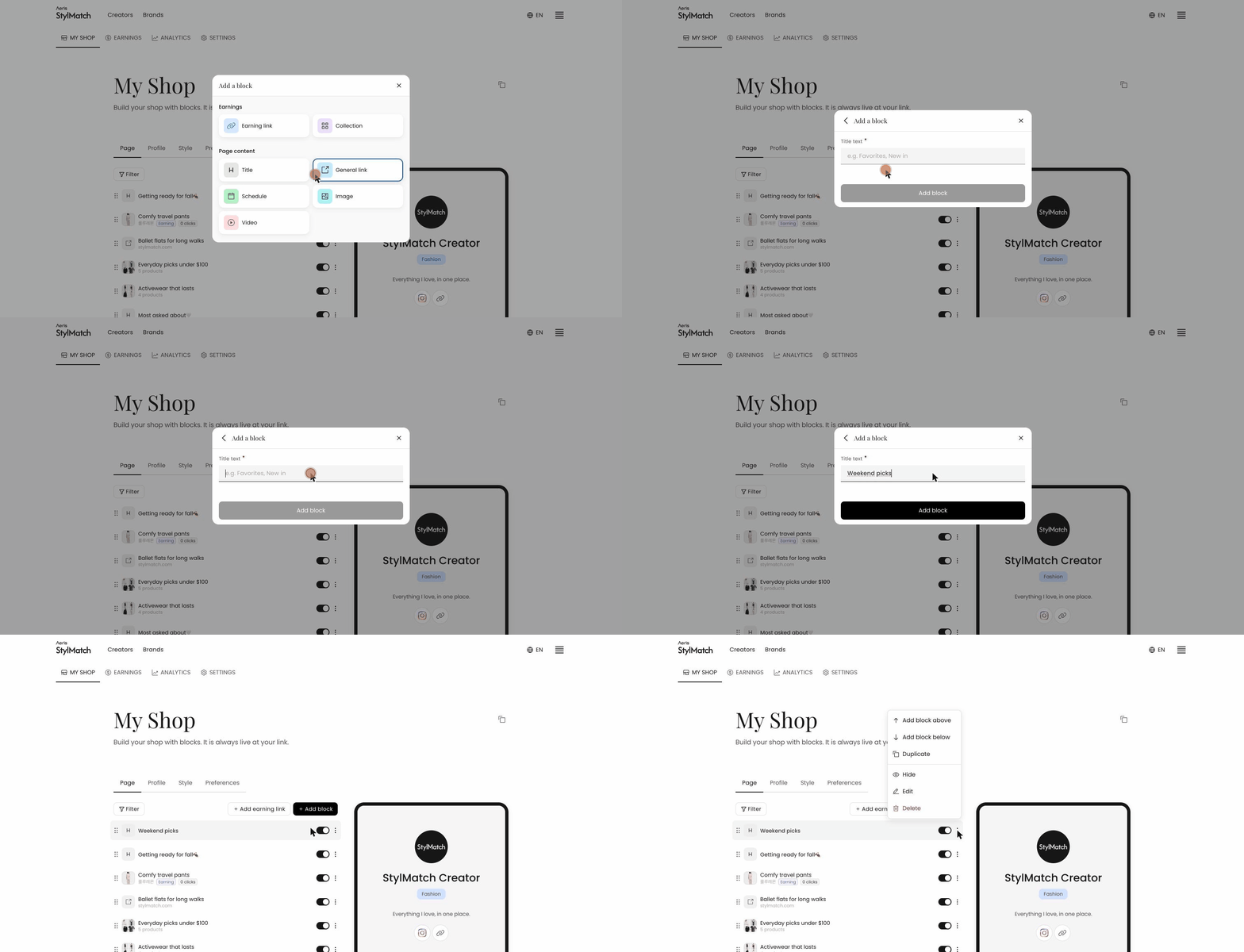 Your shop is built from blocks. The list in the Page tab is the order your followers will see.
Working with blocks
- Reorder — drag the handle on the left
- Hide — turn off the toggle on the right. Use this to take a block down temporarily without deleting it
- Duplicate, delete, or insert above and below — available in the
⋮menu - Rename — click the block title and edit it in place
Use Filter to view blocks by type once your page grows.
Which blocks earn commission
Opening + Add block shows two groups.
- Earnings —
Earning linkandCollection. These earn commission - Page content —
Title,General link,Schedule,Image, andVideo. These do not earn commission
General link is intended for pages that are not products, such as your blog or YouTube channel, so it earns no commission. To add a product link, use Add by Link.
Grouping with Collection
To recommend several products under one theme, group them with + Add block → Collection — for example, "5 Fall Jackets" or "Travel Essentials." The group appears as a single card that expands when tapped, which keeps your page shorter than listing each item separately.